1.2 is done after a few build bugfixes and documentation updates. Now I'm just working on updating the associated demo video and write up page for it. After that I plan to just keep researching raylib usage, which is turning out to be pretty perfect, since all of the headers and libraries I am used to using are the backbone of it, alongside a few others. So, all in all, it shouldn't feel much different than working on audio_vis which is great. Not much else to report this week. Just documentation and website updates while I research. Probably gonna be sparse updates here until I have something tangible for the next project. Super excited for it, so hopefully some progress to show won't take too long :)
Cody Wiggins
Audio Tools Programmer · Game Developer
5/20/26: Site updates and research on raylib
5/13/26: The first skipped weeks and a 1.2 release
Due to a death in the family, I had to take some time away for the last month. In the meantime, I did recieve a job offer, I did nearly everything I had planned for 1.2 plus some extra features, and have been working on the general research needed for the next project. With the 1.2 release, I plan on pausing any work done to this project. If users start showing up and making requests, I'll gladly return, but for now this feels like a complete and fun engine to build music visualizers with, and I am extremely pleased with it.
Completed This Month
- Added raw samples with n channel functionality
- Windows build
- Hot reload rework to now recognize new directories being made, optimized which files are updated and when, and it will now work on a background thread that utilizes the much faster ReadDirectoryChangesW and iNotify
- Added a high end gaussian pass to make high ends less hairy with a user defined sigma
- Added a fence around the gpuBuffer writes to fix a race that was occurring in a few shaders
- Added a sample drop boolean for the user to allow for dropped samples to use a smaller fftOrder and/or hopAmount, even when it can't keep up with the sample rate
- Updated all the docs for all of the new changes
- Desktop builds now use desktop OpenGL 4.4 and up with an optional ES 3.2 flag, and Raspberry Pi will user ES 3.2 automatically
- Several shader fixes and optimizations
- A new Milkdrop style shader along with a template for former Milkdrop users to create in a way that is familiar to them
- To allow for a more milkdrop style shader, normalization of fft outputs have been added, and I am currently working on blur effects as the final addition for this release to further allow for .milk style shaders
4/15/26: Nearly done with 1.1
Now that the unforeseen bills have been paid off and my work schedule is a bit more consistent, I can start enacting all the cool extra things I've wanted to do in 3 phases. As of right now, aside from some small additions, everything for the 1st phase is done aside from the Raspberry Pi testing to ensure that I'm in line with all of the architecture differences of an ARM device.
Phase 1 was everything in the completed this week section below plus full Raspberry Pi support.
Phase 2 will be speeding up hot reloading with a background thread(cross platform with a iNotify and ReadDirectoryChangesW wrapper), adding a timed shuffle mode, doing research to see how to get interpolation between shaders, more smoothing modes for the high end, more shaders, and A WINDOWS BUILD.
Phase 3 will have me beefing up the font customization heavily, looking into allowing user defined uniforms for user input, making a non ES build plus all of the new features and speed that will come with it, and, lastly, a VST3 port if I can.
Its ambitious, but I'm having fun working on this, and at this point, if I'm turned down for an audio/graphics/systems job after making this... Then they just weren't really hiring
Completed This Week
- raw hop samples ssbo (mono sum only)
- replaced error line parsing with line directive in header. It seems like some drivers may ignore this, So a warning may still be necessary along with the error log to tell the users how many lines are in the fragment header
- moved all uniforms to a UBO and a globals struct to keep a single source of truth for all frame wise parameters and many spec wise parameters
- more error handling fixes for struct parsing
- mouseX, mouseY, mouseDown, and hopSize uniforms
- allow for user defined fftSize and overlap percentage. user can set hops 1, 2, or 4 and fftSize of 1024 - 8192. Sizes are checked against user runtime variables for sample rate and refresh rate to ensure the set sizes can keep up with the sample rate. They are set as enums and are parsed like the others. Ring buffer is always 8192 * 2 * channels. It never changes
- massive series of sweeping refactors to lower sent arguments and leverage this Globals struct as much as possible across the codebase.
- looked into an onset addtion to the uniforms. The options were either do true spectral onset and have to save a copy of the entire last bin output, or do a cheap rms based onset that the user could do in a few lines of glsl code. Scrapped the idea until someone asks for it.
- directory deletion error handling fixes
- a cool waveform shader that uses the mouse uniforms
- user can now show a device list and choose which audio device they are analyzing (!!!)
- optimized text rendering heavily
- researched texture handling to ensure no leaks
- fix how errors are printed (no more check log for more details, now the user gets 512 characters, which still could be cutoff, but then they can still check the log)
- now allow for customFFTSize, hopSize, and hopAmount as usable variables in feedbackBufferSize expr
- stb_truetype and stb_rect_pack implementation to have user defined fonts
- a shader example for a font and customFFTSize expression used as feedbackBufferSize
4/8/26: Another massive 1.0 release and hella documentation, despite overtime at the day job
50 hour work week, and a couple of brutal unforeseen bills, but the work continues. Really happy with how this release is going and by the looks of things audio_vis will be a full release tomorrow with all of the documentation for users and for this portfolio that comes with it! It's a super cool project and I can't wait to keep working on it, honestly. It's surreal seeing it work as well as it does and its completely wild to say I made my own engine and not just be blowing smoke. In this day and age of just making claims and hoping it will get you a job, it feels good to now really feel like I have the portfolio to back up these applications.
Anyway, here's everything that was completed for the week.
Completed This Week
- Helper functions added to properly ensure all user input from spec input and expressions stay within type bounds and properly handle division cases as best as it can with an additional warning for the user when the result is truncated
- Shaders updated and mel-spec is looking good. Some smearing, but thats how it is at this fft size and overlap %
- Adjusted error log prints in shader compile and link to subtract away the amount of lines from the fragment header
- Rebuilt peak rms metering to better fit the use case and vectorize more easily
- Checked through path and string parsing for security. Added texture path saftey chacks and a throw in shader init
- Added destroyTextures calls on hot reload and started caching the error string (more research needs to be done on how OpenGL is handling this next week though)
- Lowered amount of glFinish() calls (just calls once on swap now)
- Optimized down to 7.5% of one core on my garbage laptop. Will be lower when I make the hot reload on a bg thread
- Organized headers into subdirectories
- Finished a Mel-Spectrogram shader along with other general shader fixes
- Feedback buffer size limit is now the lower of 4k framebuffer or hardware limit
- Feedback buffers may not work on some very small devices that allow less than 6 bindings(super rare). Best I can think to do is just warn users in the log
- Wrote a full doc to explain each item in the spec and what the options do and outline the entire process of how a user can add and build shaders outside of using the spec and give some trouble shooting tips
- Wrote a full github readme
- More error handling and parsing bugfixing regarding expressions
- Gifs of each shader for website and readme
- Lastly, just finished the full write up for the program. Now its just down to the demo video tomorrow and this will be a bonafide release :)
4/1/26: Polish, UX, refactoring, and a few cool shaders
Fun week and my schedule is mostly on track. There was a lot of work on refactoring, which was needed with how much the codebase has grown (past 4k lines now). I got some time to make a cool shader, which remakes the background of this page with some other cool stuff, under the auspice that it was needed to test some of the new functionality.
Aside from that, tons of work on making the hot reloading and the spec class interactions feel good, along with ensuring that the little details in different user setups and configurations can be handled well. The spec is now so much more readable, any input outside of direct number inputs have enums for users to use instead of numbered flags, and, probably most impressively, the user can now specify certain runtime variables along with constants in an expression for their custom buffer sizes which was crazy hard, but is super rewarding and makes everything so much more flexible.
If this pace continues, a 1.0.0 release will happen next week meeting the targets of Linux devices and Raspberry Pi's 4 and up!
Completed This Week
- Shader to test feedback buffer, bitmap font, and textures(IT LOOKS SO COOL!)
- made user defined buffers scale with width, height, or resolution based on user input
- Cleaned up customFFTSize Interps and Collates may still delete a few more
- Power, mag, or db setting can be configured in the spec for any FFT output mode
- big ole 400 line refactor out of av_bridge
- Full expression evaluation for the custom sizes: uses select variables that aren't known at compile time, constants, and +, -, *, or / (parentheses coming later)
- finalized spec and spec parser(at least until user feedback rolls in)
- now keep track of h/w and displayhz dependencies to decide if swap is necessary
- set usage bitset with each bit related to each user defined var used in user expressions in spec to more effictively know when to swap and to easily scale for more
- size assertions for user defined buffer sizes on every swap
- Uniform changes: fftSize, fftBinAmt, newAudioWindow, and renamed numBins to fftArrSize plus a refactor
- whittled main() down from 400 lines to 80 and 3 helpers and made several new classes in the process
- full rework of error handling. Outside of minor checking for type bounds of floats, it is complete and reports any and all errors well in the text log and in the error shader multi monitor setups are now accounted for and nothing from a shader or spec will crash the program or except
- made vertex shader more generic to allow for helper functions that let users pick between working in uv, px, or ndc space
- Added shuffle button(when pressed, random next shader) to input handler
BUGS FIXED
- smooth_value ramping wrong and sometimes bypassing erroneously
- bitmapped text flipped 90 degrees from renderText()
- multiple swaps could happen in one frame
- Too many error handling and hot reload bugs to recount
3/25/26: Shader switching and everything that comes with it
The goal of this week, as stated last week, was to make it as far as I can in getting dynamic swapping of multiple shaders working. That has been done along with just about every functionality I could imagine someone wanting(except for custom fonts for now). These include: hot reloading, textures(praise be to stb), bit-mapped text(and also to CCSID 437), and feedback buffers. Based on the road map I have, I am now in the fun part. This upcoming week will be making shaders that show off (and test ;D) all of this new functionality. After these tests, I'll have all the info I need on the workflow to finalize the spec file the users will create to configure the audio output along with unlock some of the graphical capabilites. If I can swing as much this week as I did last week, then the week after next will be a week of documentation, optimizations, and refactoring for a 1.0.0 release! Hell of a finished task list this week. Here's to another one next week hopefully :)
Completed This Week
- Now extracting shaders into a ShaderPreset struct with spec, the current test shader, file path info, file time info, tetxure info, a name, and error handling necessities
- Add a vector of ShaderPreset and an activeIdx int in main to loop through the shaders
- Added a uniform struct for every uniform guaranteed to the user
- Made a directory scanner to find the shaders and their spec files
- Injecting shaders with a header including uniforms, bit-mapped text, buffers from audio, feedback in/out buffer, and a few helpers for text display and a h/w convention
- Built a full parser for the config files to make the Spec structs from user defined parameters
- cmake reconfigured to now update on any shader updates and copy the shaders to the build folder for the final build
- Migrated from SDL3 to glfw for windowing and event handling
- rerouted all cout and cerr prints to a log.txt file to see all the printed info of each session
- ensured consistent lexicographic ordering of shaders in loader
- Full rework of ssobs to a custom ssbo that is persistent, turning each frame's passes of data to a couple of getter calls and a memcpy each
- Left and right keys go backward/forward respectively through shader list
- Each shader preset name is now shown in the title bar on the window
- Full screen mode toggle with the up key implemented and initial size is now based on the device monitor size
- Feedback ssbos are available to do cool things (like the shader you see in the background of this page) with a configurable size
- HOT RELOADING AND ERROR DISPLAY FOR A HOT RELOADEDED FAILED SHADER!!!
- texture usage functionality for as many as the user declares using the scanner, shader introspection, and the spec (thanks to stb_image for doing the hard part)
- Custom size outputs now give the user the option on how the low and high end are interpolated
- There are a ton of options implemented and will be pared down, but the entire system is made and over 15 different interpolation strategies are available
3/18/26: Dynamic setting of analysis tools, more custom data structures, and a quick return to signal generation
While I would love to deep dive into some of this stuff, the week has been so productive that the bullet list of tasks completed alone already makes this too long of a post. I'll do some write up deep dives in the future on some of these things, but for now I'm moving straight on to everything needed for multiple shaders and dynamically swapping them now that the architecture allows for it. While the iron is hot, I gotta keep striking.
Completed This Week
AudioSpec & Core Architecture:
- Introduced AudioSpec: a configuration struct that pairs with each fragment shader to centralise and dynamically control all analysis parameters
- All FFT, RMS, and peak variables are now driven through AudioSpec, replacing scattered hard-coded values
- Major refactor of audio.h, main.cpp, and analysis.h to integrate the struct-based config model
- AudioSpec is heavily commented throughout, with thorough explanations of every setting for shader authors
Properties Now Adjusted Dynamically By AudioSpec:
- Configurable arbitrary output size for FFT. Now delivers a clean, low-noise response curve at any resolution
- Per-value smoothing with independent attack and release rates, applied across all analysis outputs
- Selectable FFT output modes: full spectrum, audible bins only, or a custom sized cubic interpolated on lowend and RMS on highend output array
- Hold functionality for peak, RMS, and FFT bins, also entirely configurable by the AudioSpec struct
- Multiple mono-sum functions added to peak and RMS
- All analysis outputs switchable between dB and linear amplitude
- Hann windowing for FFT, and a perceptual slope parameter (arbitrary float) to shape the spectral response
- Automatic FFT array resizing on window resize — width/height dependencies handled internally
AVBridge & GPU Pipeline:
- avBridge now owns full control over which GPU arrays are sent and how they are packed — all dynamically reconfigurable via the paired AudioSpec
- Expanded uniform set passed to the GPU, exposing hold values and additional analysis metadata for fragment shaders
Data Structures & Utilities:
- New custom HoldValue and RingBuffer data structures added
- RingBuffer refactored out of the audio capture class into its own reusable component
- Full SmoothValue rework — redesigned for a more intuitive, predictable interface
sig_gen rework for 1.0.1 release:
- Identified and resolved spectral leakage in the signal generator during shader testing; addressed aliasing in the same pass
- Rewrote internal phase handling for correctness. Swapping from accumulation of phase increment, to a uint counter based model
- Added 4x internal oversampling, PolyBLEP/PolyBLAMP anti-aliasing, and a 255-tap FIR filter
- Output quality is substantially improved over 1.0.0
- After some profiling and vectorization, the new release confirmed the updated pipeline is also faster than 1.0.0
Testing:
- Built a resizable RMS / peak / FFT / hold test shader covering all current AudioSpec and AVBridge options with all cases passing
3/11/26: Continued work on a music visualization engine
This week has had me going all in on the music visualizer, aka audio_vis. Goals were met and the audio capture/analysis has been validated. Now the plan is to make this as configurable as possible for as many cool shader options as possible. To start, I have added a few classes and have a much better visual of a spectrum analyser, with many more additions on the way.
The classes added at this point have been 3 different configurations of classes based on JUCE's SmoothedValue class. First was LinearSmoothedValue, a modified version that removes all logic that could modify it to a multiplicative smoothed value and would slow the class a bit, it makes having asymmetric attack and release (which is a super common use case, despite not being readily available in the JUCE class) extremely easy, and it has a smaller size of 4 bytes from 20 to 16, which mostly becomes helpful in the next classes.
Next was the SmoothedValueArray: This class capitalizes on the smaller size of the above class to hold a single config value for all values in the array (rather than JUCE's holding a counter for each instance, since nearly all use cases would have all the values configured the same way), it has all the baked in functions as the single class along with functions to loop through the whole array, and has overloaded [] operators to directly affect the array in a way that is still comfortable. This led me to an issue though. Since the plan of this project was to work with a graphics api and give the user a configurable array of values related to the audio, these values need to make it to the GPU, whether through SSBOs, UBOs, or something else. Passing an array of 16byte structs only to use the same 4 bytes out of each struct wouldn't be reasonable, and keeping with the Raspberry Pi's memory constraints has me avoiding any unnecessary temp buffers (currently using less than half the buffers on this project than what I was using on my parametric EQ!).
This led to a Structure of Arrays configuration of the Array of Structs of the class above. This class has all of the functionality of the SmoothedValueArray aside from the [] operators. Now all functions need their normal arguments and an index argument, aside from the "all" functions that will affect all of the items. This way I can just pass the relevant pointers to the internal vectors to match the logic that I have so far in my classes of taking 2 pointers and doing the necessary operations, and to pass a vector's pointer to an SSBO for the rendering.
All of these classes do everything that a LinearSmoothedValue would do in JUCE with less overhead in memory and cpu, and address all of the shortcomings of the class. Every helper function that I would have had to add to wrap around LinearSmoothedValue are just baked right in. I'm super proud of these, and they are built in such a way that I'm sure I'll be reusing them for quite some time.
Next, was a full rework of how these arrays can be interacted with by the shader. I am not quite done with these ways yet, but a great start has been made. The plan now is to allow for each shader to have an associated struct that will tell the engine what it expects out of the audio data (fft size, hop size, log/lin scale, dB/power, sloped fft data, etc.). This struct will interact with another object that will clear most of the work being done in my main.cpp and Audio wrapper currently, and work as a bridge between the raw outputs of the Peak, RMS, and FFT classes and transform them according to the struct associated with the current shader.
Currently, to get the goal of last week accomplished, all of this is done in main, but the malleability of the data that can be given has increased dramatically by reworking the Semi-Pro-Q's spectrum analyser algorithm to allow for a linear scaled, arbitrarily sized LinearSmoothedValue array that can be passed directly to the GPU, as well as a flag to give all bins of the fft output, or just the audible bins of the fft output to ignore DC and Nyquist adjacent bins.
The goals for next week are:
- Keep the job hunt going
- Get an audio to render bridge class to take the load off of the Audio and Main classes
- Build out a complete (for now at least) config struct that can be used by the bridge to alter outputs and processes of all of the analysis classes
- As much error handling as I can for the above dynamic changes based on device specs and the likelihood of a shader author providing audio specs that are invalid or exceed device capabilities
3/4/26: Full release of sig_gen, solid progress on the visualizer, and some fun site updates
Well, I got wrapped up in further building out the signal generator lovingly known as sig_gen. Now it is a standalone binary for Linux and Windows(!!!), with much better parameter smoothing, noise functions, and build workflow if I want to add more later. It runs great now, the standalone exe is super convenient, and now I can put it on the portfolio actually feeling like its complete.
Speaking of the portfolio, its now been updated with sig_gen in place of one of the Unreal projects I had (RIP cool First-Person-Shooter Prototype), and with it came a full site rework to have a really cool VHS & CRT styled shader in the background. Hopefully next week I'll add a music player to show off some of the music I made too.
Onto the visualizer. I spent days on Vulkan tutorials and was pulling my hair out. The advice I got was to get comfortable with OpenGL first and that's what I have been doing (hence, the cool shader added to the site). The audio was collectively strengthened and the classes are staying very reusable. I have a basic reactive shader showing up in a resizeable window. The plan is to have another full audio output validation happen this week, now that I've added more functionality and a parent wrapper to house all of the reusable audio related classes. Before that though, I plan to add a bit more in terms of value smoothing, and potentially making log-scaling and perceptual smoothing easier on the gpu by handing it an array similar to the final result of the Semi-Pro-Q's (the parametric eq project) analyser.
Either way, goal was reached and then some. I have some lines in a window, better audio classes, a way better test tool with sig_gen, and the portfolio site is looking way better. Productive week all in all.
2/25/26: A solid signal generator, a nice suite of audio analysis tools, and an upcoming week of Vulkan
Neovim, Linux, and the part-time job are going well. As usual, I couldn't leave a project alone until it was far more polished than it needed to be. So, the small signal generator was pushed forward a lot and now is close to a full blown release for anyone else who may want a hyper-cheap signal and noise generator. I got tons of SDL and CMake knowledge from it and I get to use it to test the next project. Big win
Found hereNext onto the big project, by tomorrow I will have the entirety of the audio processing along with the linux device agnostic audio capturing and the windowing ready. All that will be left is the Vulkan setup.
The architecture that I finally landed on was this: SDL3 for video windowing, Vulkan for the rendering, miniaudio.h for the audio loopback capture, and FFTW3 for some help with the FFTs. I wasted a day trying to get SDL3 audio to do what I already had working in miniaudio, hoping to reduce the binary size and let SDL3 cover the entire backend, only to find out that SDL3 currently has no way of getting to the loopback. It can only get mics and outputs, and the outputs won't give a callback to read the samples. Bummer, but at least miniaudio is more than capable and everything is tested (with the sig_gen ;) ) and looking good now.
I'm super proud of how the analysis tools have turned out. Everything is covered by a single ring buffer, peak and RMS are 4 byte structs that read in place, and my FFT struct is half the size of what it was with the Semi-Pro-Q, even with all of the space requirements of FFTW3. It only requires a single window copy from the capture buffer. Plus, the fft class is so generic that it will work in tons of configurations (returns in dB or power, optional Hann windowing, optional perceptual slope with a variable slope) and it's super quick. This is the type of header that can be reused anytime analysis is needed and that feels great.
Anyway, continued work on the visualizer and job hunts this week. Job hunt has only given bad news all week, but being lucky is just an opportunity you're prepared for, and these projects keep making me more and more prepared.
Can't wait to get cracking on Vulkan throughout the week. Fingers crossed I reach the goal of having some basic lines in a window.
2/18/26: Big environment changes and a small project
The decision was made last week, and I landed in the middle: one small C project to prepare for the big Raspberry Pi project.
More importantly, I decided to push hard on what I could learn this week outside of just writing code. That led to a full change in development environment—from Windows to Linux, from an IDE (Visual Studio) to a configurable text editor (Neovim), and from a desktop to a laptop. Now I can still work on projects during downtime at my part-time job, and I get to sink my teeth into all the new Linux and Neovim tools along the way.
To get used to the new workflow, I built a small signal generator in C while forcing myself to adapt to everything. Linux was fine since I already had experience with it, but the Neovim learning curve was steep.
Another great benefit of the signal generator was getting comfortable with CMake and SDL. I'm planning to use both in the next project, so this gives me a head start.
Lastly, there's been solid forward momentum on the planned Raspberry Pi project. It now has full audio capture for any Linux device using miniaudio.h, a reworked suite of analysis tools adapted from Semi-Pro-Q and FFTW, and it's ready to move on to creating an SDL window and setting up Vulkan for rendering.
Still nothing on the job front yet, but at least the projects continue to move forward.
2/11/26: Job efforts and more site updates
This week felt slower on the surface, but it was more about recalibrating than sprinting. After finishing Semi-Pro-Q, I've been splitting time between job applications and evaluating what the next portfolio move should be. The market's been quiet on my end, so I'm focusing on tightening the technical foundation rather than forcing momentum.
I spent more time digging into shader programming and applied some of that reading directly to improvements on the homepage shader. The deeper I get into graphics work, the more it makes sense to use Vulkan for the visualizer project. That said, Vulkan will require a heavier upfront reading phase, so I'm weighing whether to start that immediately or ship another smaller audio-related project first.
There's a tradeoff between building the most impressive project and building something faster that strengthens the portfolio in the short term. Right now I'm leaning toward making the decision based on execution speed and consistency rather than scope alone. Either way, next week will lock in the direction.
In the meantime: applications continue, interviews when they come, part-time audio work to keep things stable, and steady progress on the portfolio. The beat goes on.
2/4/26: More interviews, car trouble, and site updates
Mostly a documentation week this week. Updated the project page, the demo video, and the home page to now reflect the massive changes made to the EQ. I also went through and made a professional looking GitHub README and put up the 1.0.0 release of the Semi-Pro-Q. Super satisfying to have this done and I'm so proud of it.
The majority of my week aside from the documentation has been taken up by some severe car trouble that needed solving and some interviews and applications for the job front.
Things are moving forward for the next project well though. Currently it is just ideas, basic architecture, and a list of which tools I will be using for the next project. What I have so far is that I want to make an audio visualizer for a Raspberry Pi. So, this will require a module to take in the audio samples, something to analyze peak, RMS, and FFT of the audio, then use a limited version of OpenGL to make shaders to visualize based on the hardware, and pass that audio and video through the HDMI port of the Pi. I'm really excited about this. It will give me 3 skills I have been looking forward to progressing: Linux Development, Hardware-based development, and OpenGL.
Looking forward to first steps of the next project next week, once this car is back up and running.
1/28/26: Wrapping Up The "Semi-Pro-Q"
The final boss of this project really wound up being the spectrum analyser. Who would have thought? Well, I guess I kinda figured and thats why I saved it for last. Tons of work done this week. Focus was on the analyser, but also on finalizing input/output validation, which came out great on 3 separate DAWS. I really think I'm going to let the completed section speak for itself this week. All thats left on this now is a bit of refactoring, waiting on the logo/icon to come in, and a quick rebuild for a mono version. Then I'll fully update the home page to reflect how much better this thing is.
I really can't stress how happy I am with this plugin. For years, all I have wanted to do was make cool stuff on my computer, and this last month has been spent making the exact EQ I want to use. Now its onto the next thing with a super cool idea I have for what to do with this Raspberry Pi my partner got for me.
Below are some images of some of the white noise and pink noise test results.
They show exactly what they should given the goals of the analyser: 4.5 dB/octave slope, +12dB, and scaling according to the peak meters
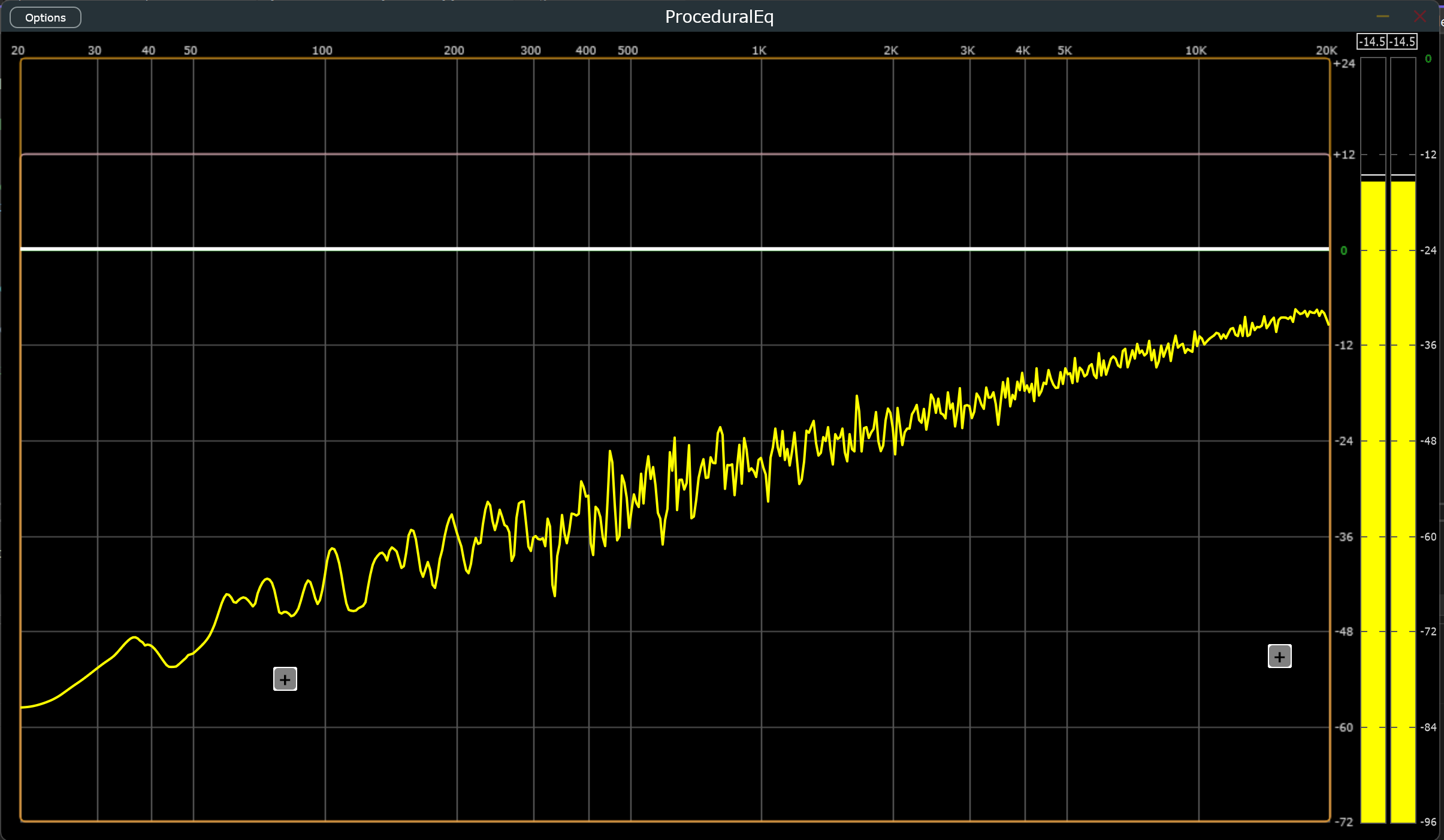
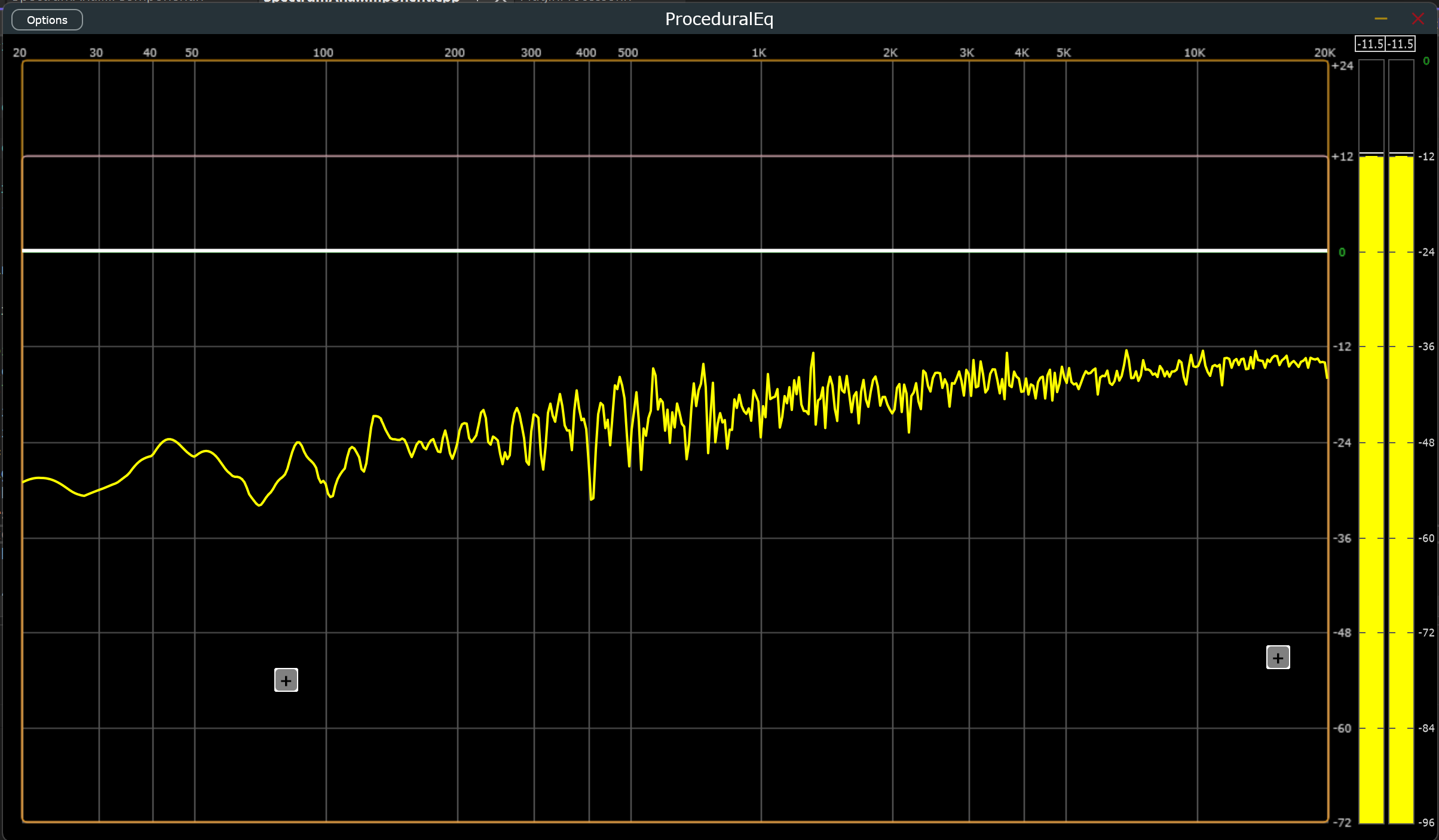
Completed This Week:
Filter Architecture Refactor:
- Completely restructured filter/coefficients system to match ProcessorDuplicator/Filter/Coefficients setup with a more logical stage->filter->eq architecture
- Implemented idiot-proof interface with only four interaction methods (prepare, process, readCoeffs, update)
- Conducted massive refactor to ensure thread-safety and proper encapsulation. Its down to 0.5 kb per filter exactly, which was super satisfying
Spectrum Analyzer Improvements:
- Eliminated DC offset issue and fine-tuned smoothing parameters for clearer visual response
- Increased FFT_SIZE to 8192 for superior visual quality despite computational expense
- Implemented per-pixel calculations with cubic interpolation for the first half of the spectrum and RMS averaging for remaining bins
- Added 4.5 dB/octave tilt to better match music-focused analyzers
- Implemented dynamic scaling based on peak meter scaling plus ~12 dB offset for improved visualization
- Configured frame updates to refresh at 1/FFT_HOPS * FFT_SIZE with 75% window overlap
- Added timer callback functionality to paint next lerped value for smoother real-time feedback
Component Architecture & UI Enhancements:
- Created reusable MinimizableComponent class to handle minimize/maximize functionality across multiple components
- MinimizableComponent also houses the drag functionality for moving the components anywhere in the window
- Added ValueTree property storage for component positions with proper save/load serialization
- Replaced expensive label components with optimized black rectangles with white text for better performance
Comprehensive Validation & Testing:
- Validated peak meter, EQ interactions, gain interactions, button interactions, response curve, and spectrum analyzer
- Tested automation and bus channel routing across Studio One, Ableton Live, and Reaper
- Confirmed settings and state serialization functioning correctly
- Verified total memory usage from custom code remains below 0.5 MB
Parameter & Settings Updates:
- Extended all filter gain parameters to allow up to +24 dB boost
1/21/26: 2 big fixes, massive housekeeping, and ever nearer to a pro EQ
2 of my 3 big ticket items are done from last week, with a lot of progress on the 3rd. Zipper noise and parameter change clicks are now entirely removed, which is huge. The spectrum analyzer still shows minor inconsistencies in the low end, but it's noticeably more stable, a bit faster, and much prettier than it was a week ago.
To follow up from last week's issues:
- Response curve rendering no longer exhibits issues associated with high slopes. This turned out not to be a graphics problem at all. The curve was just too honest, exposing some inherent shortcomings of high-Q digital filters at very low frequencies.
- Spectral analysis still shows occasional inconsistencies after extensive testing, but far fewer than before. Along the way, the component received major optimizations and quality improvements.
- Noise from coefficient updates is completely eliminated!!! This was the big one.
There was a story I used to hear about Edison making the lightbulb, and how he failed 1000 times and said he didn't regret it because he learned 1000 ways not to make a lightbulb. That's how I feel after finally cracking IIR coefficient swapping without zipper noise or clicks. I have tried so many things with wildly varying degrees of success, but the solution is here now and I'm super excited about it.
If you prowl enough DSP forums, you'll see a few common recommendations for this problem: switch to a state variable filter(SVF), smooth your parameter changes, or crossfade between double-buffered filters. You'll see a few other suggestions that will also most likely be bad, but these are the 3 most common.
I tried all of these and many other solutions while trying to make the JUCE classes work. Each of these changes generally require tons of changes throughout, and due to having so many filter types, often cascade down to affect that complexity as well. The SVF decision is clear. It's substantially less versatile than IIR filters. Having no noise is great, but with only 3 filter types, it's not feasible. Parameter smoothing alone doesn't solve the core issue: coefficient swaps still cause recursive state variables to temporarily blow up without a reset, producing audible clicks. Lastly, the crossfade suggestion. Super expensive computationally, and takes up double space for all filter stages. It's brutal and will not scale properly volume-wise without some even more extreme math to account for loudness changes. Linear interpolation and dB don't play well if you want to avoid a noticeable dip in volume during the crossfade. So then on top of all the other expenses multiplicative interpolation is needed and may need to be carried over across process blocks, and even when you get all of that it still has zipper noise, but just less of it. I knew there had to be a better way.
The True Zipper Noise Fix:
The hypothesis I gathered was this. Rather than lerp the parameters, lerp the coefficients themselves, because the large jumps in coefficients were what caused the zipper noise. This wound up being right, but also revealed a second issue: recursive state variables struggling to re-sync under large per-sample coefficient changes.
This ramp time issue with the Smoothed Value coefficients was super interesting. At anything over 20 ms, the state variables of the filters have trouble handling the changes per sample and would impulse-pop at low frequencies. At anything below 6 ms, the zipper noise comes back. At around 10 ms, both problems disappeared: smooth sweeps, no clicks, and no zipper noise across all parameter changes!
Achieving this required rebuilding JUCE's Coefficients, Filter, and ProcessorDuplicator concepts from the ground up, since their implementations are tightly coupled. While doing so, I stripped out templated features I didn't need and purpose-built everything for this EQ. The new system uses slightly more memory, but performance is comparable across the board, and in some cases faster, even with adding the internal smoothing, bypass handling, and coefficient replacement logic.
I can't stress how happy I am with these custom classes. They handle so much that they make my processor's logic so much simpler too, especially after housing both the coeffs and filter in a struct that covers all of the initialization. This was easily the trickiest problem to solve in this, and this solution was super satisfying to reach. The rest from here is just validation, polish, and cleanup. As far as functionality is concerned, these filters are officially of professional quality!
Completed This Week
Handrolled IIR Filter System(SmoothFilter, SmoothCoeffs, & EqStage in /Utils/Processing.h):
- Completely rewrote Coefficients & Filter classes to implement per-sample linear interpolation of coefficients on all parameter changes
- Entirely worked in mono/stereo compatibility with simpler and faster logic than the Juce Processor Duplicator class
- Maintained thread-safe reads for GUI while adhering to JUCE safety standards
- Reworked all parameter updates, filter initialization, prepare-to-play logic, and process block logic to accommodate custom classes
- Created parent struct to hold both classes and streamline initialization
- Successfully eliminated all zipper noise and clicks from parameter changes!!!
Response Curve Component(ResponseCurveComponent.h/.cpp in /Components/Visualization/):
- Implemented ideal analog equation from parameters for more accurate magnitude readings (Peak and Notch filters only)
- Squashed lingering bugs in curve rendering
- Further optimized repaint calls by caching the drawn path
- Aligned curve frame drawing behavior with spectrum drawing for consistency
- Reduced lag between response curve and button interactions to acceptable levels
Code Organization & Documentation:
- Added comprehensive documentation throughout codebase
- Separated all components into individual files
- Organized components into a logical directory structure
1/14/26: Intriguing Interviews, Baffling Bugs and Coefficient Conundrums
A lot has been moving forward for me on the job front this week (exciting!) and that has taken a bit of this week's time, but for the most part a decent amount still got done and this eq is nearly finished. That is... Outside of the hardest parts. Its ok though, since I knew enough testing and data validation would bring these problems to the top of my todo list now that all of the features are implemented. All in all, I'm super proud of this thing and once I have a solid fix for these three issues I'm going to consider this eq shipped and of studio quality.
The three current issues are: 1. Response curve drawing is having problems with drawing high slopes, 2. Spectral analysis is showing some inconsistencies, and 3. getting noise after coefficient updates from parameter changes.
For the response curve I have tried all sorts of clamps, entire reworks to the logic of getting the magnitude, hardcoded cases for notch and 10 q band pass filters with log scaling, and loads of other fixes. Nothing has quite nailed it yet, but it has led to some optimizations and better consistency. Its starting to look like its an issue deep within the JUCE::Path classes that are dropping the portions of the lines that are 1 pixel wide but have too high of a slope. I have a few more ideas to try out next week as I continue testing and getting validation on the other issues. This one is only an aesthetic issue that happens on edge cases. So, its last on the todo list, but the easiest to describe, which puts it first in this explanation. :)
Spectral analysis is specifically showing noise in the low end (less than 160 hz). I've done a lot to try to remedy this. Added a high pass to the buffer, added smoothing to the values, reworked path drawing to ensure it was a sampling issue, added clamps anywhere I could, tried multiple ways to rework how I am feeding the samples to the windowing function and FFT, but this issues persists as well. I still have a few more ideas to try out in my todo list, but the good news is that the output is looking great outside of the DC offset issue and will be finalized once that is fixed and a few more smoothed value tweaks happen.
Next is IIR filters dealing with potential fast and very large changes to their coefficients. This is a problem that has a lot of ways that it can be helped, but no perfect solution. The parameter smoothing did help a bit on frequency, gain, and quality changes, but brought along with it a lot of other changes to anything that used the parameter values. A full day was spent attempting to crossfade double buffered processor duplicators on filters, which led to a much more cpu intensive crackling sound that was worse than before. I've seen some claims about per sample coefficient updates, and, even though that sounds so wildly expensive, its the next on my attempt list for solutions to this problem. Zipper noise is a very common problem when dealing with IIR's and as much as I would love to write a whole book about it, I figure I should wait for that until next week when I, hopefully, can bring in a solution while explaining why this is such a tricky problem to solve.
Completed This Week
Peak Metering:
- Smoothing of the outputs with variable attack/release for when the signal is going up or down
- Complete clip notifier per channel implementation with a functionality to click on the meter to dismiss it
- Complete peak hold bar implementation with a variable hold time and linear sink to next highest peak per channel
- Optimized and refactored drawing
IIR & Coefficient changes:
- Added parameter smoothing to frequency, gain, and quality
- Attempted state resets for each type, db/oct, and bypass change
- Tried per sample coefficient smoothing
- Tried crossfading coefficients across changes between processor duplicators
Spectrum Analyser:
- Reworked lerping between bins to be much more optimized and consistent
- Optimized rounded path drawing
- Brought back smoothedValues and gave them the same attack/release logic as the peak meter
- Worked toward the DC offset issue: added slight highpass, clamped to avoid freqs less than 20 hz, loads of small changes to the logic, and concocted more ideas to implement for next week
General UI:
- Refactored all timers to the UI parent: now only one timer callback is triggered and it checks dirty booleans in each child component to trigger a repaint
- Tooltip flickering issue has been fixed
- Draggable button logic reworked to better keep up with the response curve changes
- Continued efforts to finalize the response curve, but slight flickering issues persist at high enough slopes
1/7/26: More progress toward a studio ready equalizer
This doesn't look like as much done as last week, but that's due to the fact that a few of these things required entire structural reworks(listed below in the State Management bullet points), and the optimizations being put as one bullet a piece, when they were pretty intense. The spectrum analyser and response curve got some massive savings.
Now onto why I did those reworks and why its gonna be really important next week. Automation. In any DAW, a user has all parameters exposed to them to automate changes in the grid of the DAW, which means all logic has to account for changes from outside the GUI, and anything exposed as a parameter must be something you are ok with the user automating. Plus, parameters are way more expensive than the properties that I have replaced many of them with. Now, all parameters only affect filters, and anything affecting GUI is done in the properties of the ValueTree state. So, they still get saved and loaded in the same way as the parameters, without being exposed to the DAW. Properties being substantially smaller objects than parameters is a nice plus as well.
Also, there's the full rework to peak metering from RMS. Peak metering is much more common with these kind of tools. I'm sure the RMS component can be used later on for another plugin. So, it wasn't wasted time. There was also a day of looking into the possibility of implementing true peak metering rather than sample peak, which would be great for something aimed at mastering engineers, but this is more geared toward mixing engineers. Mastering engineers often have much less of a worry about CPU usage since they are generally just working with the stereo or 5.1 tracks of the mix. The mix on the other hand could have 100s of tracks, making this plugin much more useful for that environment. As much as I would like to try and get true peak, sample peak is way cheaper and is more in line with the initial goals of the plugin. I'll save the true peak implementation for something in the future.
I'll just end this with what is left and the good news, which is that I think this plugin should be 100% complete by the time I'm here next week! I currently need to rework a lot of the logic/drawing of the peak metering, possibly add in resizing(its not very common or expected in audio plugins. So, not necessary, but the UI cleanup I've been doing to prepare for it has made the codebase so much easier to work with. That alone was worth the work), getting a logo and an icon made, and a massive round of stress testing, particularly for parameter automation.
Here's some progress images from the initial iteration, to last week, to this week. Coming along nicely :)
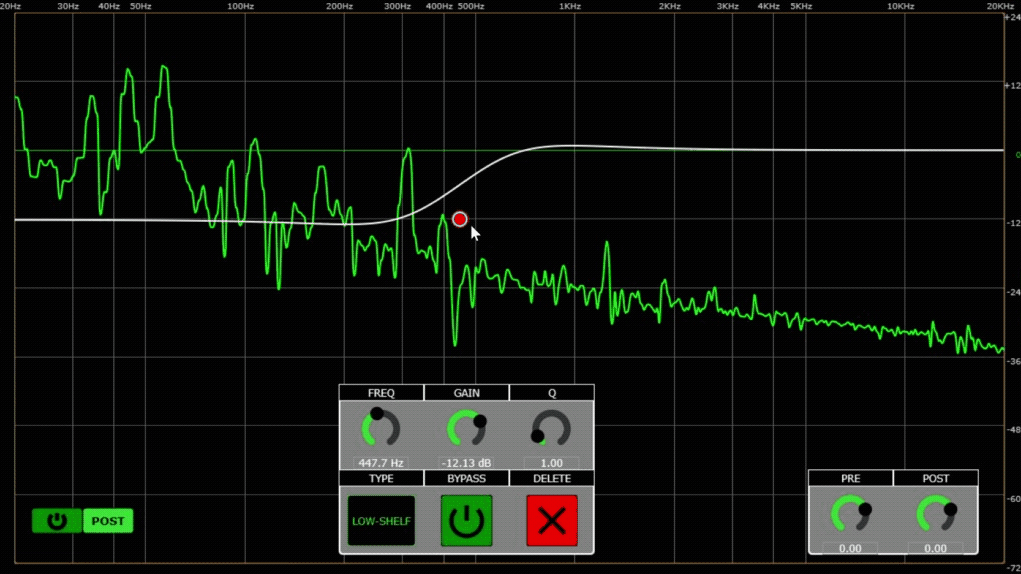
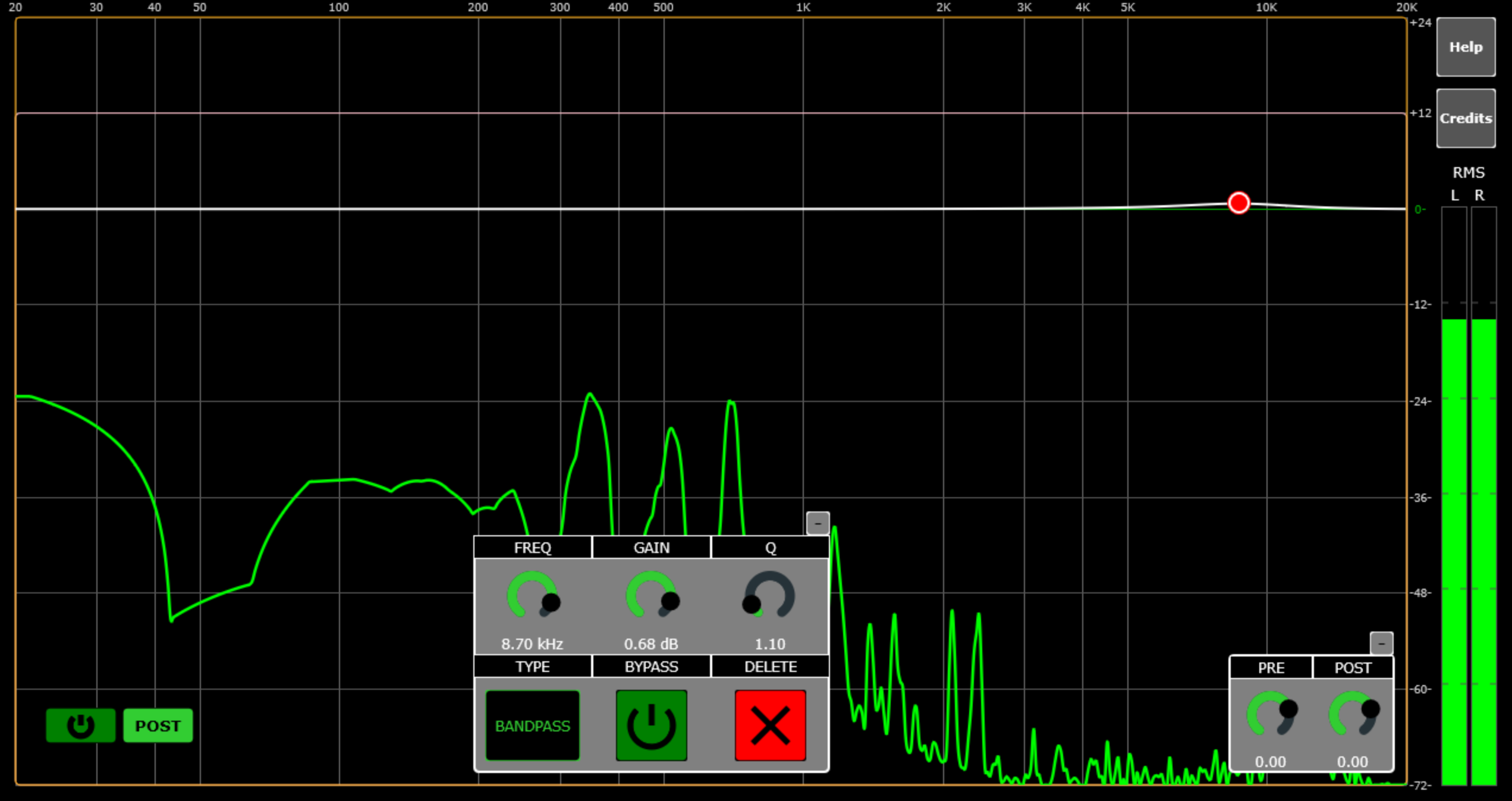
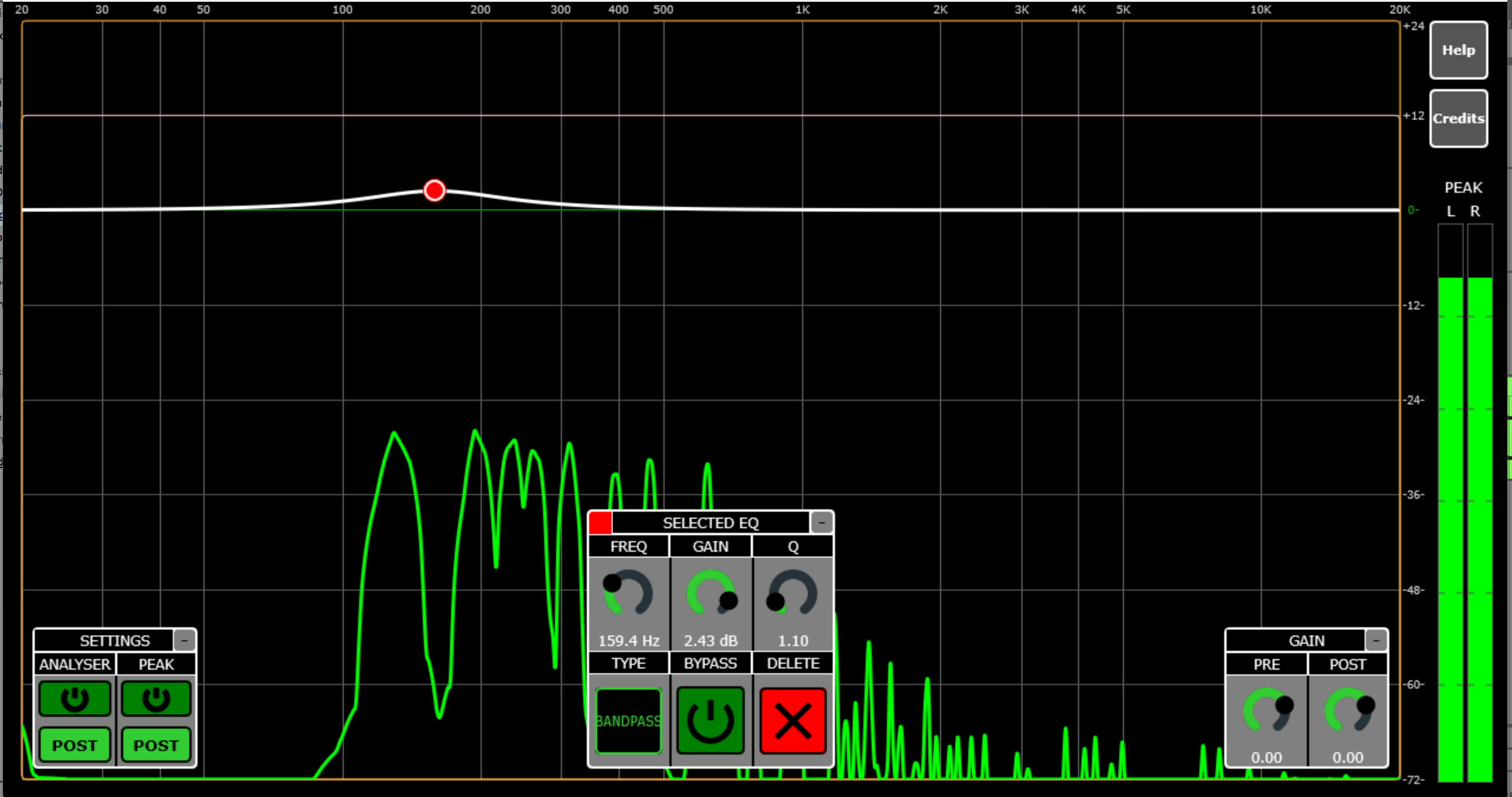
Completed This Week
UX / GUI
- Peak on/off and pre/post mode buttons implemented
- Analysis settings buttons housed in new labeled, minimizable component
- Selected EQ color indicator now displayed in top corner of component
- General UI polish: continued progress toward resizing support and component sizing/drawing logic improvements across the board
- Finalized help and credits menus look and feel
State Management / Persistence
- All minimize values, spectrum analyzer & peak state booleans(power and mode), and selected EQ integer now saved and loaded with parameter tree as properties
- Moved initialization out of parameters into properties (front-end only changes)
- SelectedEQ logic reworked to save preferences and align with property values in tree
Performance / Optimization
- Response curve optimization variable added: 4× the speed while maintaining visual quality
- Spectrum analyzer fully reworked for more linear, smoother, and significantly faster operation
- Heap usage reduced by ~30 KB from spectrum analyzer improvements
Architecture / Refactoring
- Moved all value listeners to the editor to reduce juce::Value::Listener inheritance
- Required complete rework of filter visibility system in GUI
- SelectedEQ logic refactored for cleaner state management
- RMS metering fully reworked to peak metering system
Cleanup / Code Quality
- Removed vast majority of magic numbers from pixel placements
- Remaining magic numbers limited to size/topLeft variables, occasional single use variables, and numbers that are precomputed or have a clear use
- Component sizing and drawing logic standardized across the codebase
1/1/26: A New Year and More Cool Additions to the EQ
Christmas and New Year's Eve were great, and I've gotten a ton done on this EQ. I'm having fun, so I'm going to keep it going until the todo list is empty. Getting back into C++ has reminded me why I love it so much, and this plugin is turning into one that I'll be using on all of my music projects!
At the bottom of this post there's a quick list of everything I finished this week. Some of those changes uncovered new bugs. Others gave me ideas to improve safety and functionality. A few turned out so clean that I want the rest of the project to hit that same level. The todo list keeps growing as fast as the "done" list, but it will be worth it.
Most of this week was cleanup on the work from last week: the RMS meter, truly allocation-free coefficient writing, and reworking coefficient read and write paths to be fully thread-safe using a sequence lock that only spins the GUI thread(GUI will retry reads if the coefficients are mid-update, while the audio thread never waits). I'm pretty proud of that one. I also spent time on optimizations, especially in the response curve, and added an entire new set of features with three new filter types (Butterworth high-pass, low-pass, and notch).
The big remaining items, aside from ongoing testing and bug fixing, are adding resizing support, continuing to polish the GUI (hopefully with some new logos and icons from my graphic designer friend), and doing a few more optimizations and refactors I know are still needed. The spectrum analyzer in particular needs some love.
I want to talk a bit about JUCE and filter coefficients, because they can be a pretty massive footgun if you are new to audio or real-time programming. I really do love JUCE. This is said with a lot of admiration. But it is an insane choice to make the most obvious way to create filter coefficients (the Coefficients class) force a heap allocation on every coefficient update, which will happen from most parameter changes. For real-time safety, that is bad news. Heap allocations take an unpredictable amount of time, and real-time safety needs predictable timing, otherwise you risk glitches in audio playback or in the GUI.
To avoid that, you have to dig into the struct inside the Coefficients class and call its factory functions directly. Then you stash the results in your own pre-allocated array, and finally copy those values into the Filter's StateType's coefficient space. It works, but it is not obvious the first time through.
And then you discover that the Coefficients object constructor factors out one of the coefficients so it can store fewer floats (a 2nd-order filter ends up with five rather than the normal 6). That is another detail you have to handle yourself. So you wind up re-implementing that logic too.
I am still grateful the API exposes everything. It is great that you can dig down and build what you need with the great references it provides. But it also makes it really easy to misuse, which is the opposite of what JUCE intends with this framework. Any person using an IIRFilter and updating it in the audio thread, like anyone would assume you should do, will wind up with an entirely malfunctioning eq. Also, any tutorial out there on the classes I have seen or read hasn't mentioned this, which leads me to wonder how many bad eq projects must be out there. So now my project never creates Coefficient objects directly, except for the ones required inside the filters themselves. And this concludes my JUCE Coefficients class rant 😄
Completed This Week
UX / GUI
- Prototype help and credits windows/buttons
- Minimize functionality for SelectedEQ and Gain components
- RMS lines added to show dB more clearly
- RMS meter color now matches analyzer mode
- Prepped response curve for future resizing
- Atomic "coalesce repaint" flag added to avoid redundant paints
Audio Engine / Real-Time Safety
- New struct for coefficient read/write that never allocates after startup
- Sequence-lock pattern added — GUI can spin, audio thread never blocks
- Removed unnecessary getRawParameterValue calls (only pre/post gains + 2 analyzer bools remain)
- Coefficients now only updated in processor constructor and process block
- Removed parameter magic numbers entirely (pixel magic numbers next 😢)
Performance / Optimization
- Smoothed values for analyzer and RMS using juce::SmoothedValue
- Spectrum analyzer now only updates when FIFO is full (based on fft_order)
- Refactored getMagnitudeForFrequencyArray(): preallocated freqs/mags, precomputed freqs, guaranteed safe coeff reads
- Response curve repaint triggers only on actual coeff or dB/oct changes (lambda + std::function + async message handler)
- More deliberate dirty-flag usage to reduce unnecessary coefficient rebuilds
Features
- Butterworth-style high-pass and low-pass filters
- Added notch filter type
Cleanup / Misc
- Spectrum analyzer fixes and general polishing
- Better architecture around coefficient handling
12/24/25: RMS, heap allocations, and better thread safety for the Equalizer
Well, that sickness took much more time than I would have liked, but the first project was chosen, I'm finally better, and the holidays have been great so far. The current progress on the eq is not the largest, but a small RMS metering component has been added and some initial actions for making the Coefficients class allocate substantially less and strengthening the thread safety of reading and writing those coefficients. The struggle with the RMS was keeping with the main tenet of this project, which was to keep it cheap. The best process I came up with for this is to have the rms happen directly before each spectrum analyser update to use the fifo setup I already had for both components. The next issue was ensuring that the rms could read for both channels separately, but the spectrum only reads a sum. There were a ton of options for how I could do this, but the solution that was chosen was to have 2 fifos. So, there's a bit more expense for stereo input signals now, but is basically free when using a mono signal. The rms operations and mono summing for the spectrum analyser now entirely happen on the gui thread just before the normal fft operations for the analyser. There still needs to be some testing and prettying up on the front end, but so far I'm really happy with the outcome. This was the last big feature I initially planned for this.
The other major work was eliminating heap allocations from the audio thread. Previously, every time a parameter changed (like frequency or gain), the plugin would create new filter coefficient objects in the real-time audio callback—causing unpredictable delays and potential glitches. The solution was implementing a lock-free double-buffer system: the GUI thread pre-computes coefficients and writes them to an inactive buffer, then atomically swaps which buffer the audio thread reads from. Getting this to work safely across three threads without locks was tricky, but the atomic operations approach worked perfectly. Now the audio thread just does a simple 24-byte memory copy instead of allocating objects. The result is substantially faster and safer filter updates and zero chance of audio dropouts during automation.
So, that's what is done for the little bit of the week that I've been able to work. My todo list is looking pretty large for next week and I'm excited. Plans are to finish the removal of heap allocations in the audio thread/process block, add a minimize functionality to a few of the components, add a "how to use" button, pretty up the gui, and smooth the output of the RMS meter and, maybe, the spectrum analyser as well. If I can get all of that done, I'd also like to add an option to use the Q parameter as 1-4 octave slopes for high/low pass filters (12/24/36/48 dB/oct) rather than traditional Q-based slopes, to better align with common pass filters in modern production.
While I'm here, why not do a small year end list :)
- Movies:
- Bugonia
- The Monkey
- Sinners
- Music:
- Gnostician - Unification as an Art
- Terrifying Girls High School - Sad Boys' Swimming Hole
- Infinity Knives/Brian Ennals - A City Drowned in God's Black Tears
- Billy Woods - GOLLIWOG
- For Your Health - This Bitter Garden
- Hayley Williams - Ego Death At A Bachelorette Party
- Games:
- Demon School
- Clair Obscur: Expedition 33
- Honorable Mention for Pillars of Eternity 2: Deadfire. It didn't come out this year, but I played through it again and it was incredible
12/17/25: Grades, refactors, and new features are good for what ails me
First devlog. This is exciting! All my final grades are in, which is also exciting! I have gotten sick 2 days after graduation! Substantially less exciting. Either way, time to hit the ground running. I've spent the last 6 months of college waiting for the moment where I get to work on my own stuff full time. I'm finally here. To start, I think my main goals (outside of some weekly job applications and daily interview prep) are to beef up the current 3 portfolio projects, work on something new that is at least adjacent to game development or audio tools, and get more comfortable in a few areas that I'm not where I want to be yet.
The areas I want to spend some more time in is the priority. These are:
- The Unreal Engine animation pipeline
- Unreal specific C++
The current list for possible additions to portfolio projects is:
- FPS Prototype:
- Ghosts to show prior best time runs(a speedrun classic)
- Fully embrace making Neon White's mechanics and build a card system(and scrap the pointless stamina system)
- Add more levels and enemies(a perfect excuse to get to know the animation pipeline better)
- Optimize, refactor, and polish using everything I've learned since the I did the project 6 months ago
- Horror Puzzle Game:
- Upgrading enemy AI, models, and animations (another good spot to engage with animation)
- Randomizing the maze while remaining solvable (BFS and some careful door/key placements)
- 12-Band EQ:
- Adding an RMS meter using short term fourier transforms
- Adding A- or K-Weighting to the spectrum analyzer to more closely mimic human loudness perception
- Multi-filter high and low pass that can be manipulated by octaves rather than Q to fit industry standard (I currently can only think of dynamically stacking filters for this. There has to be a better approach)
- Optimizing a bit of the memory use and rendering operations (I think everything can be done without the GUI coeffs and stay thread safe, and I know the response curve can be cheaper)
- If I don't optimize those out, at least set up a way where filter coefficient array reallocation is substantially less common (preferably not happening at all)
This section is new projects that I want to do and bring to completion.
- Sokoban & C++: (My sokoban love knows no bounds)
- This seems like a perfect small project to make to gain Unreal C++ knowledge and find any other gaps in Unreal knowledge outside of networks
- Perfect oppurtunity to see just how optimized I can get the runtime of an Unreal game
- An excellent skillset to get before diving back into the complexity of Liberators
- Raspberry Pi: (I love low level things and my wonderful partner got me a one!)
- While I'm not sure on what will be done with it, there are so many cool possibilities
- The current idea I would like is to emulate an NES. The memory and cpu ops of it are so well documented. I think that would be quickly doable and a lot of fun!
- A cheap and small LKFS meter: (why do audio plugin companies make these do too much)
- Would love to work on more audio plugins, and this could definitely be done in a week
- This would be another audio tool that I would use frequently like the eq
- I was an audio engineer during the loudness wars. I cannot overstate my appreciation for a good true loudness unit meter
- Liberators: (This is a turn based tactics game that I would love to work on again, but I'm afraid that the mess I made in it so early in my programming journey may make the work done mostly unusable)
- It will need one heck of a refactor, and last I remember some serious look into some very crazy build tool errors.
- Catch myself back up to speed and finish the enemy AI
- Refactor grid logic and pathing to C++
- Continue development based on the todo list I left myself. Animation pipeline was right around the corner.
This leaves me with a tough decision, but the plan is this: 1 week for each portfolio project to get all of the features I have listed, more polish, some refactoring, and make a devlog on each Wednesday with the updated project. This way I can have better portfolio projects and at least get more acclimated to Unreal's animation pipeline with the FPS and horror games. Next will most likely be the Sokoban game, but I'll cross that bridge when I get to it.
With the planning out of the way, the future logs oughta be much shorter. I've just been thinking about what I would do once I attained freedom for so long, that this is the place I could finally spill it all out. Plus, putting future work out there in the world will make me accountable for it. See you next week with a fresh coat of paint on one of the current selected projects :)